Topaz Detail products page

Overview

Topaz Detail

Topaz Detail is uniquely designed to give you full creative control over all aspects of detail enhancement without creating edge artifacts.

Easily add a sense of depth, achieve unbelievable crispness, and define previously obscured details in your images with the innovative technology in Topaz Detail.

Red

Before and after - detail enhancement with no artifacts. Photo credit William Braucksiek.

Topaz Detail internally separates the image into three detail sizes - small, medium, and large details - and offers exceptional control over the precise manipulation of each detail size. This offers limitless possibilities for photographers, who can accomplish anything from high quality image sharpening to creative detail manipulation with just a single plug-in.

Features

Topaz Detail is ideal for any photo where detail enhancement or reduction is involved. It quickly and effectively solves any detail-related photography problem faster than any other method.

  • Get unprecedented control over small, medium, and large image features and detail

    Topaz Detail allows you to find the perfect balance of detail in your images by giving you ultimate control over the detail enhancement process.

    The Visitor

    "The Visitor". Photo credit Brian P. Slade.

    Effortlessly make your photos pop by taking advantage of the best detail enhancement technology currently available.

  • Apply crisp and clean image sharpening without fear of oversharpening

    A recurring problem currently with all sharpening techniques is that they create sharpening artifacts known as "overshooting" or "halos". Topaz Detail uses very recent advances in micro-contrast imaging technology to completely eliminate these sharpening artifacts for highly effective and very natural sharpening.

    USM vs Detail


    Topaz Detail completely eliminates the concept of "oversharpening". No matter how far the image is pushed, there won't be a single edge halo.

  • Create stunning black and white photos quickly and simply with selective toning option

    In addition to halo-free detail enhancement and sharpening, Topaz Detail also offers selective tone control that increases luminance based on color families. This makes it easy to convert color images into stunning black and white photos.

    Cat


  • Take advantage of an extensive presets system Use one of the many included default presets to speed up your workflow and learning curve. Then, save your own presets and download more from other photographers for unlimited possibilities.
  • Enjoy professional workflow advantages Don't compromise on your workflow. Topaz Detail is fully 16-bit compatible, optimized for multiple processors, and Photoshop CS4 64-bit compatible. It also works with Aperture, Lightroom, and iPhoto.

Workflow

Topaz Detail enables photographers to easily take full control over image detail manipulation. It accomplishes this through a streamlined workflow and highly functional user interface that is both fast to use and easy to learn.


Step 1 - Open image in Topaz Detail

detail_menu

Bringing your photo into Topaz Detail is as easy as going to the Topaz Detail menu item in an assortment of image editors, such as Photoshop, Elements, Paintshop Pro, Irfanview, iPhoto, Aperture, and Lightroom. (See the Compatibility page for more information on using Topaz Detail in individual image editors.)

Step 2 - Apply Presets

Presets menu

Topaz Detail offers a number of built-in presets to use on your photos. Although each photo is unique and can be affected by the same preset in a different way, presets provide a great starting point for most photos. Sometimes, one click on a single preset may be all you need to create a stunning photo.

If you adjust the settings and find something you like, you can then save your work as a custom preset. This preset will be available for you to use on any future photos that you process through Topaz Detail. You can also share your presets and download other photographers' presets for unlimited possibilities.

Step 3: Adjust Sliders

The power of Topaz Detail becomes apparent after the first time you touch the adjustment sliders. These sliders plug directly into the powerful detail enhancement engine under the hood and gives you complete control over the level of detail and sharpness you want in your final result.

The Detail sliders directly manipulate image detail according to the size of those details. Adjust small, medium, and large details completely independently of each other for the perfect detail amount without the "overprocessed" look. The Deblur sliders interfaces directly with sophisticated deconvolution technology to actually reduce the amount of blur in your image caused by lens imperfections or slight camera shake. Finally, the Tone and Color sections offer precise control over other aspects of the image. Many photographers use them in combination to create stunning black and white photos.


Topaz Detail puts a complete toolset of powerful detail enhancement and sharpening technology at your fingertips for a very modest price.

How It Works

"Any sufficiently advanced technology is indistinguishable from magic."- Arthur C. Clarke

Topaz Detail is not magic, but it does manage quite an impressive feat: detail enhancement, micro-contrast improvement, and effective sharpening with absolutely no halos or edge artifacts. In other words, no matter how much you sharpen your image or pop the details out, you will almost never get any image halos or unsightly artifacts in your image. To the best of our knowledge, this has not been done in any other software product.

Internal Topaz Detail processing flow. Click to enlarge.

Topaz Detail accomplishes this by internally separating the image into a couple of different parts: small details, medium details, large details, and color. Then, sliders are used to independently change the strength of these parts, which results in more or less detail in exactly the places that you want without any artifacts whatsoever.

Here's what happens behind the scenes:

  1. After bringing your image into Topaz Detail, pre-processing starts. In this stage, Topaz Detail separates your image into the four segments: small detail, medium detail, large detail, and color.
  2. The user adjusts the strength of these segments using sliders (or presets). Each individual segment is affected appropriately.
  3. After the user is satisfied, Topaz Detail re-combines all four segments into one image, which is outputted back into Photoshop.

Examples

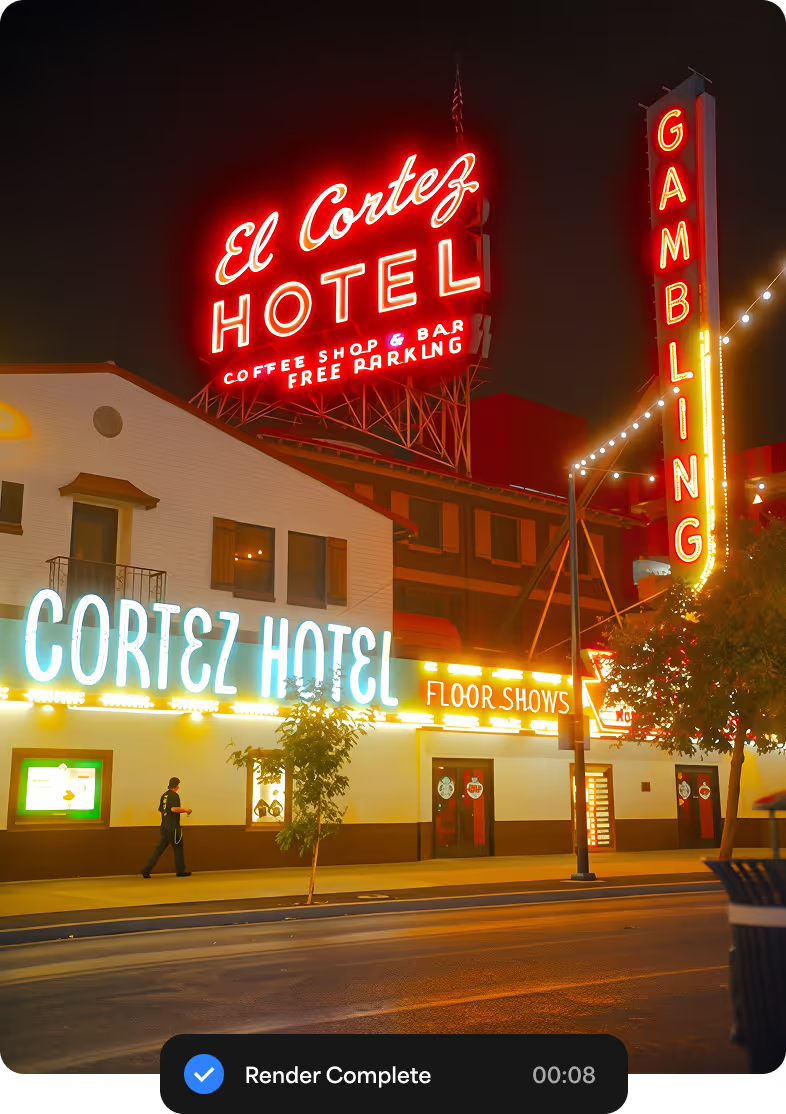
Beachhouse

Photo credit Peter Hernandez.

Leaves

Roll over for image before applying Topaz Detail.

The leaf details in the above image are still natural but much sharper than the original, and there is not even a hint of edge sharpness overshooting or artifacting.

Mountain

Roll over for image before applying Topaz Detail.

Topaz Detail breaks every image down into three separate detail types - small, medium, and large - and offers full control over each detail size. It can greatly accentuate the features of any image and give it that elusive "pop" without any nasty artifacts or unwanted effects.

This is especially good for landscapes, architecture, and cars.

Interior


Topaz Detail accentuated the mood and details in this interior shot and gave it a glossy, polished quality.

Car


This car was processed in Topaz Detail for more depth and more attitude. Especially notice the change in the front wheel.

Compatibility


Windows


  • Windows XP, Windows Vista, or Windows 7
    (32-bit and 64-bit)
  • 1 GB RAM
  • Adobe Photoshop 7 through CS4, Adobe Photoshop Elements 1-8, or another editor that supports Photoshop plug-ins. These include: Irfanview, PaintShop Pro, etc.


Mac


Collapse...
Just took a brief look at the new update and I REALLY like the layout of the new screen and the quick preview at the top left will certainly improve workflow. Really nice update to this program. I am having more and more trouble deciding between adjust and detail for my main photo enhancements.
Quote Ric Kirchner's commment
Ric Kirchner at 09:49AM, Feb 9th 2010.
THANK YOU ERIC AND ALL THE OTHER PEOPLE AT TOPAZ LABS FOR THIS GREAT NEW VERSION OF DETAIL.

It all started out when I became addicted to Topaz Moment and could not do without it, though I yearn for more controls (hint about still pending new version). Then along came the Topaz Bundle and I was hooked on that, but particularly on Detail. See what you've done to my work habits!

Seriously, the new interface is beautiful and an easy transition to make from ver.1. The additional new processing features are a nice complement to the existing ones. They look very promising though I haven't tried them extensively yet. I never found Detail ver. 1 particularly slow on my dual core HP machine and certainly not on this quad core HP. But this new version is so fast its near instantaneous on my quad core.

The revised users manual is simply beautiful and very nicely done. On those rare occasions when I've needed to call on support, I've always appreciated the quick, personal and direct help. I've had excellent help from all three of the Topaz people who do support and greatly appreciate it. With Topaz, there is no trying to deal with a person sitting in an office in India, who is reading from a manual and really has no personal experience with either the hardware or the software.

I sincerely hope your company never grows too big to continue to offer new innovative versions, with generous free updates and that invaluable direct personal support service. I also like the improved web site and all the ways users can interact and comment.
Quote Jeff's commment
Jeff at 05:40PM, Feb 8th 2010.
I just downloaded the software, My first impression is... This software is awesome, really fast, and beautiful. I am loving it.
Quote Saud R. Kazi's commment
Saud R. Kazi at 04:29PM, Feb 8th 2010.
The great thing about Topaz Labs software is it doesn't just work with Adobe Photoshop. Their plug-in's work with Corel PaintShop Photo! Topaz Detail 2 works fantastic with Corel PaintShop Photo X3 Pro.
Quote Shaun Nelson's commment
Shaun Nelson at 04:14PM, Feb 8th 2010.
I just wanted to say how wonderful this new Topaz Detail v2 is. I was able to download it as soon as I got the email and wow, this is very special what you guys were able to do. I played around with it and this is something I have never seen before. Congratulations for what you were able to do with this v2, it is any photographer dream come true. It is so sophisticated, great, and the result is just dynamite.

Congratulations and can't wait to use it more.
Quote Richard Bea's commment
Richard Bea at 04:14PM, Feb 8th 2010.
Thank you so much for the upgrade - very cool additions & speed is great! I haven’t had time to play with it much yet but I sure will enjoy it. I love every one of your products that I have. I use at least one of them on every image I edit now. Great work and great customer service!
Quote Bonnie Glidden's commment
Bonnie Glidden at 04:10PM, Feb 8th 2010.
All I can say is "WOW". You guys really hit it out of the ballpark on this one.
Quote Joe Matt's commment
Joe Matt at 03:39PM, Feb 8th 2010.
Detail 2.0 is an excellent evolution from 1. Importantly, it starts up a whole lot faster and that really gives a great impression. Patience may be a virtue, but a quick start-up is just great! The deblur controls are also really well implemented and makes your plug-in work even better as a one-stop B&W conversion and adjustment tool. Haven't tried colour yet, but it will surely be great for that as well. The overall layout is very nicely done too. Good job!

Thank you, and rest assured I will go on using and recommending your products.
Quote Gert Bolwig's commment
Gert Bolwig at 03:08PM, Feb 8th 2010.
I just installed Detail V.2. I really like the new interface--it is easy to use and looks very nice. The speed improvement is significant.

Thanks for the great work and the wonderful upgrade policy that you have.
Quote Orrin Fackler's commment
Orrin Fackler at 02:50PM, Feb 8th 2010.
Earlier today I downloaded and installed the new version of Detail. Thank you for making this available to your current users and subscribers at no charge. Not a lot of software companies do that. Believe me, that attitude at Topaz Labs has "made the sale" of your new products to me and to a couple of semi-pro photographer friends of mine. It is definitely a factor in our buying decisions.

Thank you again for your company's refreshingly positive attitude in supporting your customers!
Quote Stu Elwing's commment
Stu Elwing at 01:10PM, Feb 8th 2010.
The new version is fantastic in all ways! Love the way it works.

I won't elaborate any more at this time, but after doing so many hundreds of pictures, I can say I can't live without Topaz's filters. I liked Topaz right from the beginning, and have enjoyed all the versions. Thank you so much.
Quote Ed Cullison's commment
Ed Cullison at 01:00PM, Feb 8th 2010.
Awesome! I'm running Win 7 64bit, CS4. Detail v2 is a huge free upgrade. Because Topaz supports it's users and products is why I own nearly every Topaz plug-in.

Thanks!
Quote Steve Hill's commment
Steve Hill at 05:58PM, Feb 6th 2010.
I really like this updated software for Detail. The interface is beautiful and it looks like my Adobe Lightroom and the speed is greatly improved. I will tell others. Thank you again, you guys are Great!
Quote Ray Wilcox's commment
Ray Wilcox at 05:57PM, Feb 6th 2010.

Add a Comment

You can use following HTML tags: <a><br><strong><b><em><i><blockquote><pre><code><img><ul><ol><li><del>

Confirmation code:


See more comments or leave your own...

Collapse...
  • stuck in customs
  • surfbits
  • garmahis
  • mulewings
  • graf
  • pandmac
  • cblogger

Independent reviews (Review our software)

Community Talk


Loading...