New
Web Apps




Desktop Apps



Need product and account support?
Contact support team
New
Web Apps
Desktop Apps
Need product and account support?
Contact support team

Industry-leading image enhancement models in one simple-to-use online platform.
Removing noise is the easy part. Removing it without turning feathers, skin, and wood grain into a smooth, waxy, painted-over surface is the hard part, and it is where most tools fall down. A denoiser either separates real detail from noise and keeps the texture, or it blurs everything uniformly and leaves the photo looking plastic. We ran a real high-noise photo through the most-used online image denoisers and judged each on two things: how completely it cleared the noise, and how much true detail it kept, at 100% zoom.
The platforms tested include Topaz Labs, Picsart, Nero AI, PixelBin, and Visual Paradigm. In our test, Topaz Image Web with Denoise Max gave the best result by clearing grain completely while keeping the most feather and wood detail. Picsart came closest. Nero AI was a strong contender, while PixelBin softened fine detail into a waxy look and Visual Paradigm left a faint pattern in the smooth background.
Read on to see more details on the results for each tested platform.
For our test, detail preservation was the primary criteria. We judged at 100% zoom alongside how completely each tool cleared the noise.
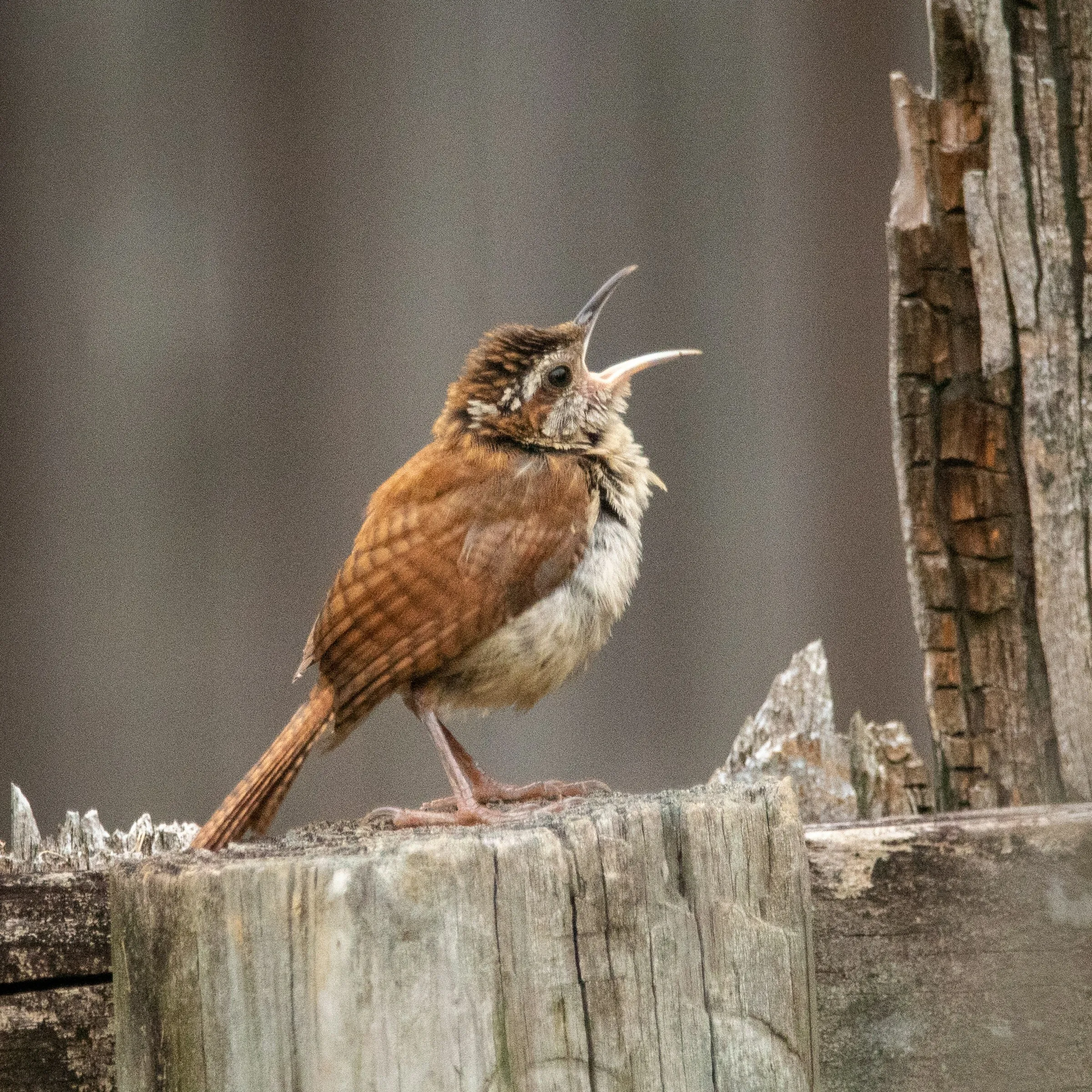
We decided on a sample image that contained high-noise : a Carolina wren on a weathered stump with heavy grain across a smooth out-of-focus background and fine texture everywhere it counts including the streaked face feathers, the barred back, the fluffy breast, and the cracked, weathered wood.
It's a difficult case because the smooth background is where noise and clumsy smoothing show most while the feathers and wood are where a tool either keeps real texture or smears it. Each platform received the same source file and ran at its default settings, then we compared every result against the original at matched viewing scale.
Here is the sample image used:
Here is a high-level visual overview of each platform's denoising result laid out :

Two areas of failure show up clearly. The first is softening, where feathers and wood grain smear into a waxy surface, which is what dropped PixelBin and Nero AI.
The second is a faint leftover pattern in the smooth background, a sign the noise was suppressed rather than cleanly removed, which is what showed up in Visual Paradigm. Only Topaz and Picsart avoided both, and Topaz kept the most true detail while doing it.
We also measured each result. Detail kept is the fine-texture (mid-band) energy in the feather and wood regions relative to the original, so a value above 100% means texture was slightly rebuilt. Noise cleared is the drop in noise in a flat background patch. Residual noise is what is left in that patch on a 0 to 255 scale, where a value near zero means the area was smoothed completely flat.
The chart leads with detail on purpose, because that is what separates a natural result from a waxy one. Removing noise by itself is a relatively simple task so the real test is doing it without erasing detail or texture. The tools with the highest noise-cleared scores got there by over-smoothing, which is why their detail bars are the shortest.
Now let's dive into each platform's results in further detail.
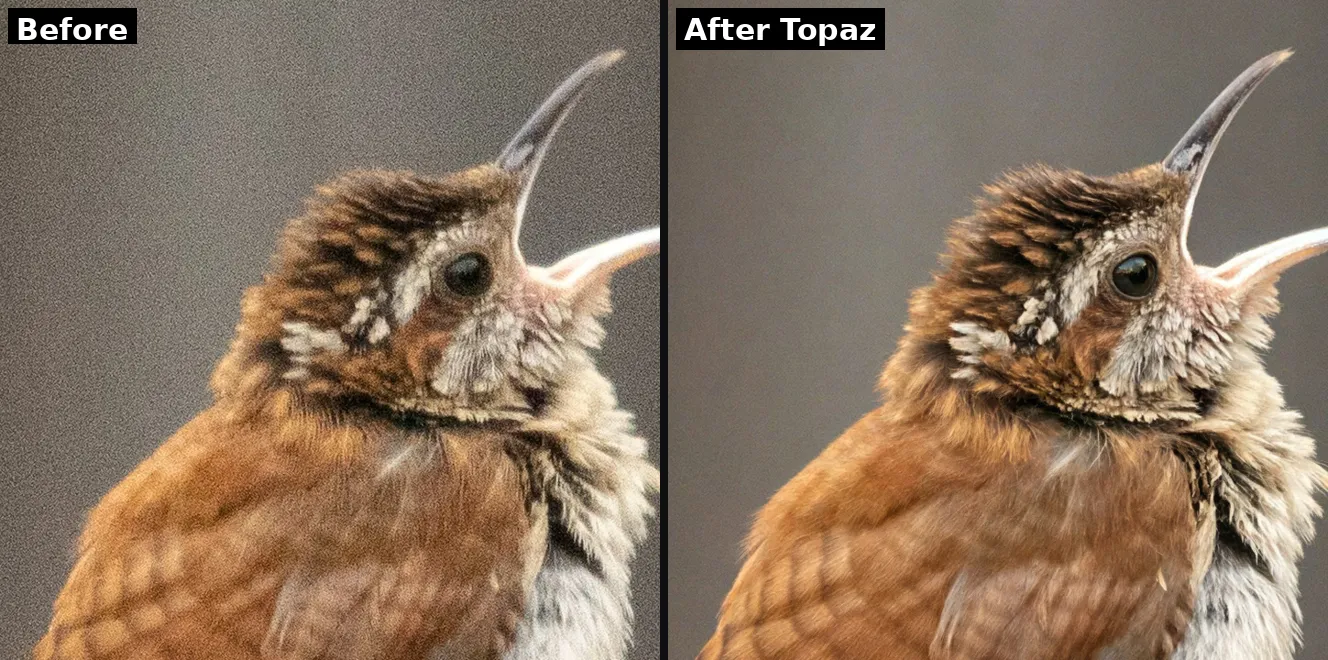
Topaz Image Web with Denoise Max produced the best result by a clear margin. It removed the heavy grain from the smooth background completely while keeping the finest detail intact: the white streaks on the wren's face, the individual feather barbs on its head and back, the catchlight in the eye, and the grain and cracks in the weathered wood all stayed sharp and natural. Nothing took on the waxy, painted look that denoising usually causes.
It runs the Denoise Max model in the browser, with a denoise strength control and a Recover Details slider so you can clear noise without erasing texture, and it held the native resolution. Because Denoise Max is trained to separate real detail from noise rather than blurring uniformly, it keeps the texture that flatter tools smooth away.
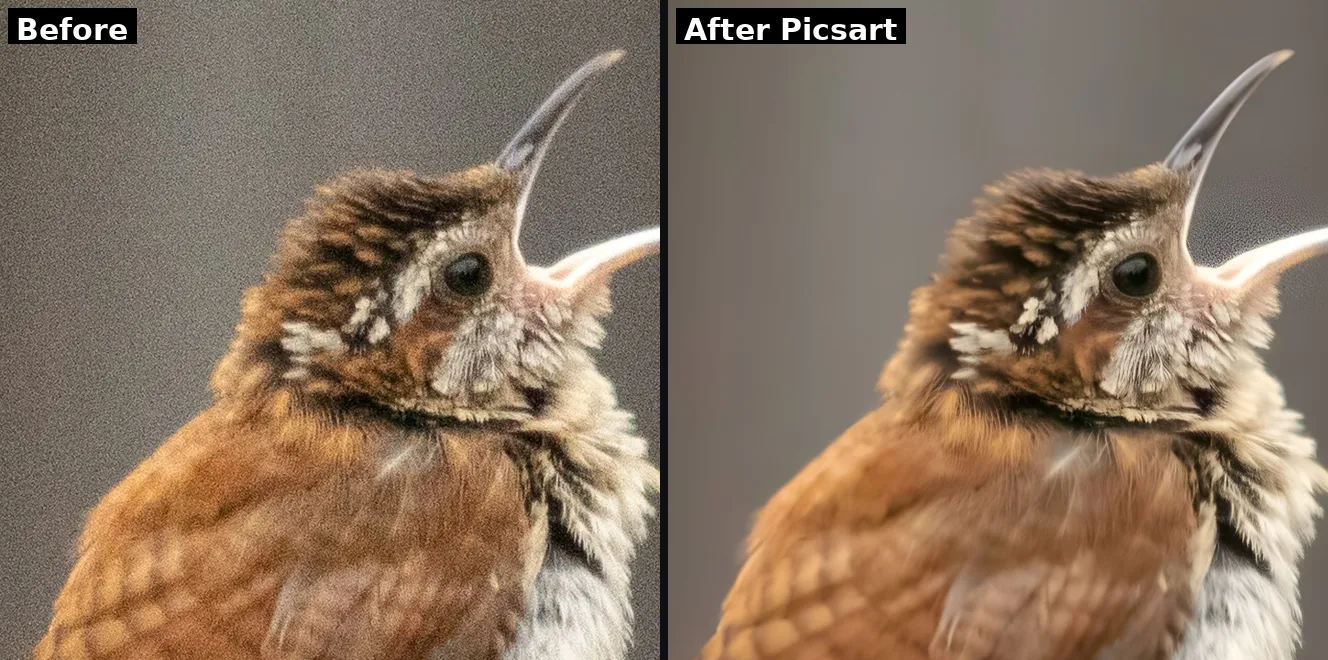
Picsart was the closest competitor. It cleared the background noise cleanly and held detail well, with sharp feather streaks and legible wood grain, close to Topaz on this shot. The differences are that it renders with a bit more contrast and a slightly more processed look, and it enlarges the image while it works, so some of the apparent sharpness is added resolution rather than recovered detail. As a denoiser it is strong, just a touch more aggressive and less faithful than Topaz. In numbers, it cleared about 98% of the noise but kept the least fine detail of the capable tools, about 74%.
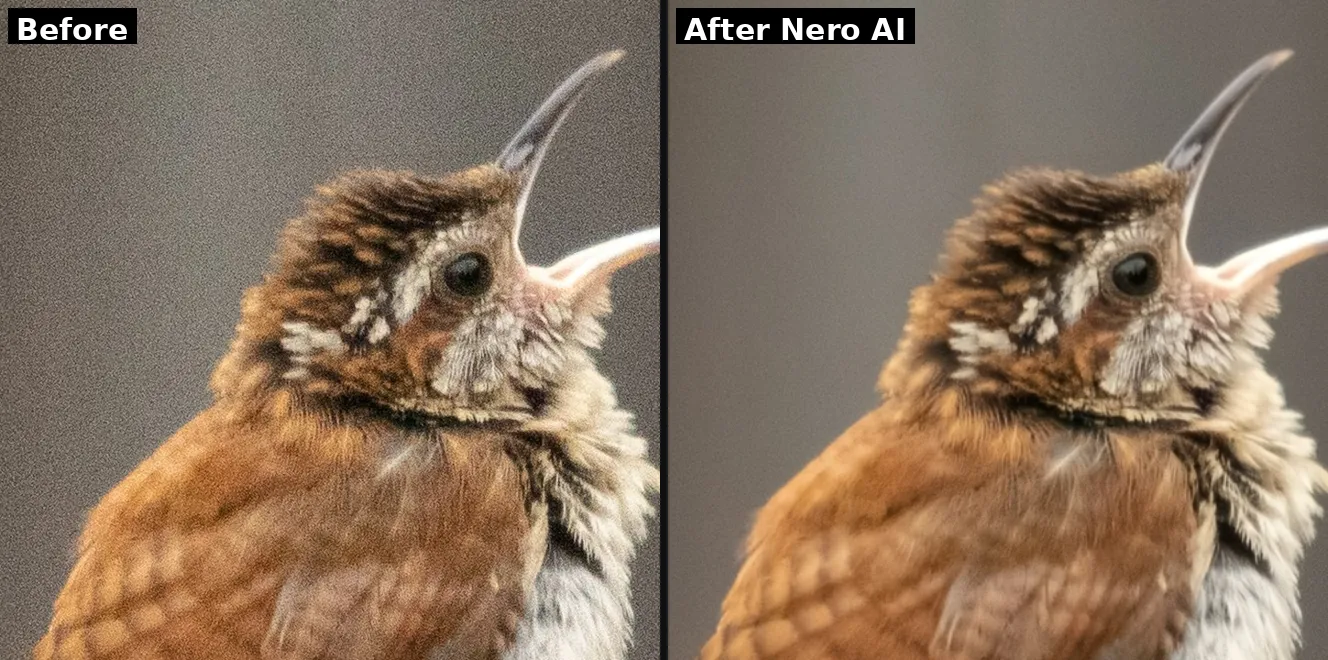
Nero AI provided some good results. It cleared the background noise cleanly and kept a natural look, with no color blotching and no leftover pattern. Where it falls behind Topaz and Picsart is the finest detail: the smallest feather streaks and the wood grain are slightly softened. For a fast, free, automatic clean, it is a solid result. It measured about 87% noise reduction with about 80% detail retained, a balanced middle.
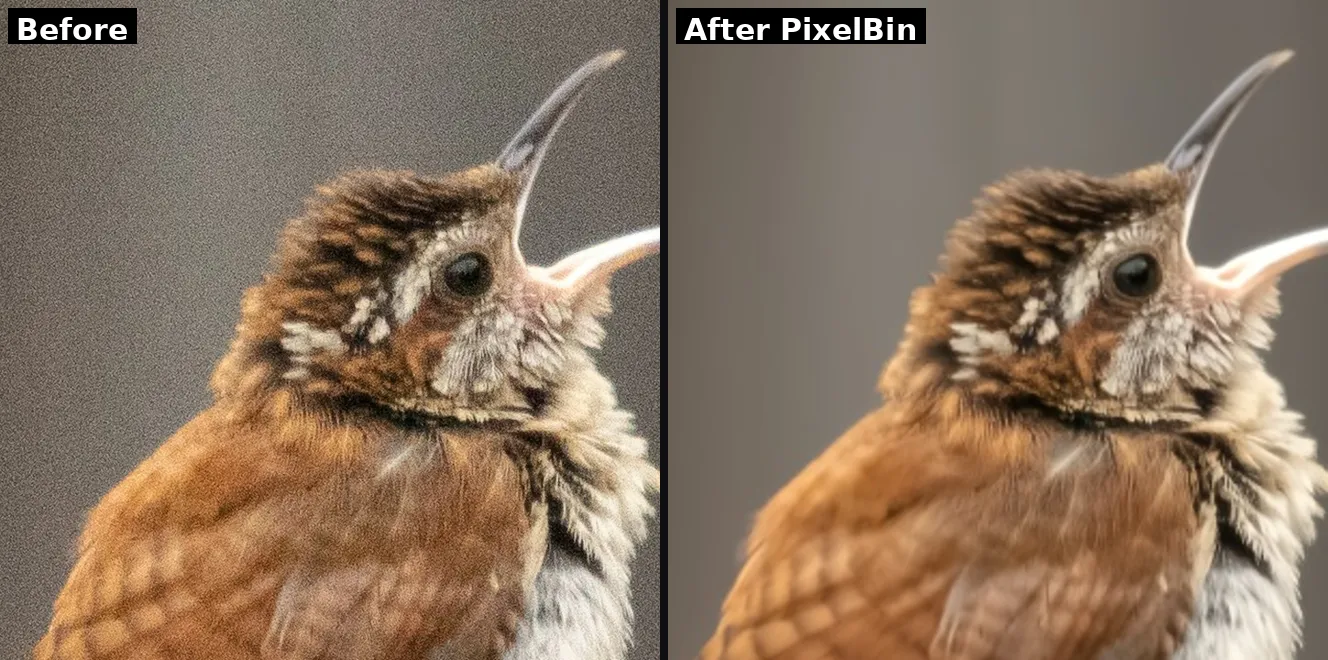
PixelBin cleaned the noise aggressively and the background came back very smooth, but it traded away fine detail to get there. The feather barbs and wood grain are softened and slightly waxy, and the smooth background shows some faint low-frequency mottling. It is the over-smoothed look that good denoising is supposed to avoid. Fine when a clean, soft result is enough, less so when texture matters. It measured near-total noise removal, about 100% with residual near zero, but only about 76% detail retained.
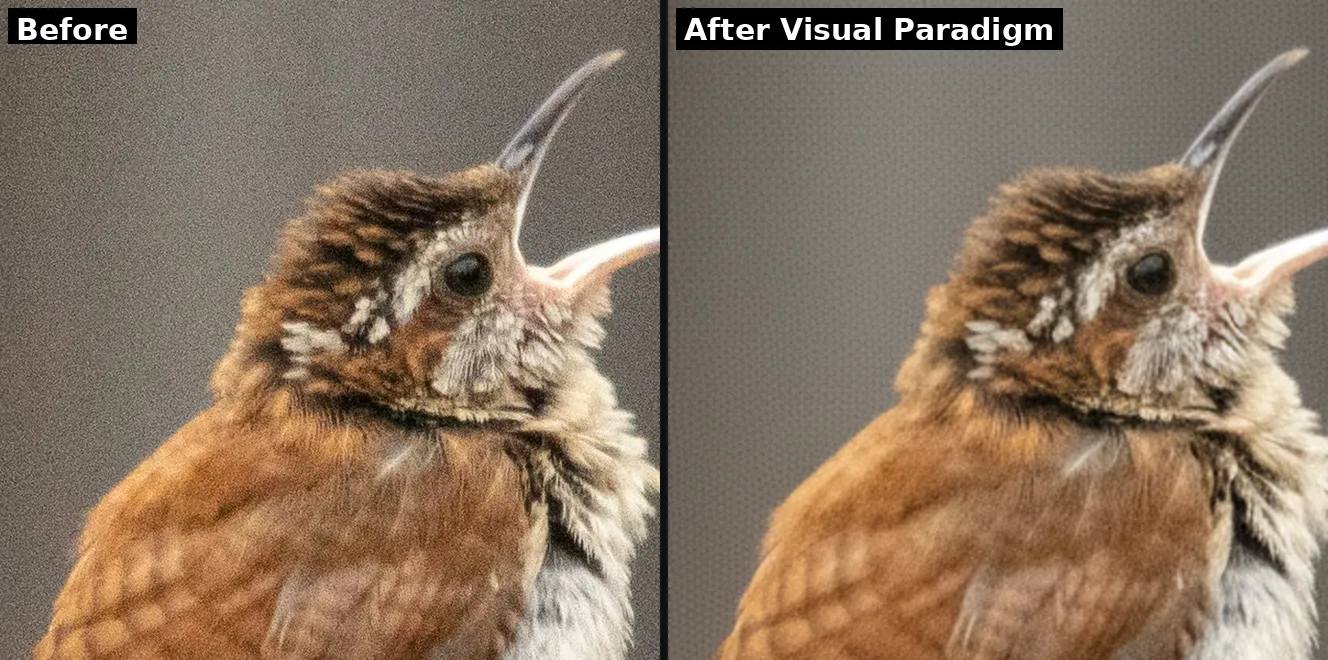
Visual Paradigm was the weakest of the set. It removed the coarse grain, but it left a faint repeating cross-hatch pattern across the smooth background, and the feather and wood detail came out soft. The pattern is the giveaway: the noise was suppressed rather than cleanly removed. It works for a quick casual clean, but it is a clear step below the others on quality. It measured the least noise removed, about 77%, and the highest residual at 3.1, which is the pattern rather than clean grain.
For the cleanest results with the most detail preserved: Topaz Image Web with Denoise Max, which clears noise while keeping real texture.
For a clean result plus editing and enlargement in one place: Picsart, if you can accept a slightly more processed look.
For a fast free one-click clean that stays natural: Nero AI.
For a quick free cleanup when some softening is fine: PixelBin.
For RAW files or maximum control: a desktop app such as Topaz Photo (see the FAQ).
For the cleanest result with the most detail kept, Topaz Image Web with Denoise Max is the top pick, because it separates real detail from noise rather than blurring uniformly, and its Recover Details control protects texture. In our test it removed the grain completely while keeping the finest feather and wood detail, where other tools either softened it or left a pattern behind.
It can, when a tool smooths the whole image uniformly to hide noise, which is the classic waxy or painted look, and it is exactly what we saw from the more basic tools in this test. Better models separate real detail from noise and keep the texture. Topaz Image Web with Denoise Max includes a Recover Details slider specifically to keep that texture while the noise is cleared.
Most online denoisers handle JPEG, PNG, and WebP only. For RAW files, use a desktop app such as Topaz Photo or a RAW-native denoiser, which read the unprocessed sensor data and give you more to recover.


© 2005 - 2026 Topaz Labs. All rights reserved.


