







In order to help you get started quickly, Topaz Video comes with a variety of pre-made presets available for you to use for a starting point for your project.
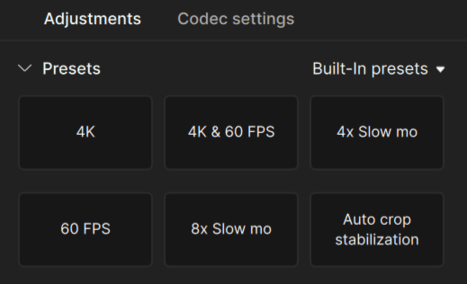
In order to use one of these presets, simply select one upon importing a file, or select one from the Presets section towards the top of the right rail. There are by default 13 different pre-built presets. You can also create your own presets. Simply click '+ Create new' to save your currently selected enhancement settings.
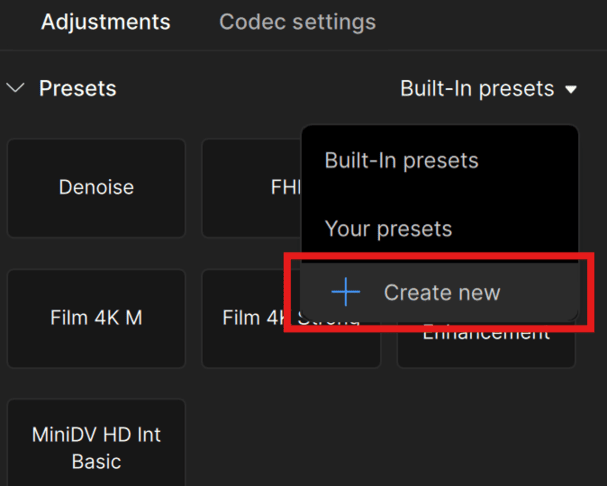
Here is additional information about each built-in preset:
4K: This preset applies the Proteus model to upscale videos to 4K (3840x2160) resolution with a small amount of detail recovery.
4K & 60 FPS: Applies the Proteus AI model for 4K upscaling and minor detail recovery alongside the Apollo model for frame interpolation to achieve 60 FPS.
4x Slomo: This preset uses the original video source’s native frame rate and applies the Apollo model for 4x slow motion.
60 FPS: Updates the input’s native FPS to 60 FPS. Uses the Chronos Fast AI model which is specialized for FPS changes and a bit faster with outputs than Chronos.
8x Slomo: Uses the original source FPS. Prepares processing for 8x slow motion using the dedicated frame interpolation Apollo model for up to 8x slow motion.
Auto-crop stabilization: This preset applies stabilization to the video via the Auto-Crop method. Keep in mind that using this stabilization method will result in a smaller video resolution than before stabilizing.
Denoise: Uses the Nyx AI model to reduce noise in your footage. Keeps the original resolution.
FHD: Applies the Proteus model to set output resolution to FHD (Full High Definition 1920x1080) resolution along with minor detail recovery.
Film 4K L: Intended for film stock (8mm, Super 8mm & 16mm) content that may require some light denoising and touchup. Works great with outputs from consumer grade film converters. Upscales to 4K with Stabilization on by default which can be disabled if not needed.
Film 4K M: For film stock (8mm, Super 8mm & 16mm) content that may require stronger treatment for some medium grade or average amount of denoising, compression reducing and restoration. Great with most outputs from consumer grade film converters. Upscales to 4K with stabilization on by default. Can be disabled if not needed .
Film 4K Strong: For film stock (8mm, Super 8mm & 16mm) content that requires an aggressive/strong treatment for some additional detail, sharpening, denoising, compression reduction and restoration. Great with most outputs from consumer grade film converters. Upscales to 4K with stabilization on by default. Can be disabled if not needed.
General Enhancement: Defaulted to 4K, this uses Proteus as the base model and has some specified settings that focus more on compression reduction and a little more sharpening. There is less emphasis on noise and detail strengths from the Proteus auto settings.
MiniDV HD Int Basic: This preset is a good starting point for MiniDV users. With roughly a 15 year lifespan, Mini DV footage quality and condition varies greatly. These settings provide a more general setup for Full HD outputs, automatically detects/addresses interlacing fields, sharpens, addresses some digital artifacts, aliased edges and reduced haloing.
Keep in mind that all of the above presets can be further modified to better fit your use case. Any pre-built presets you adjust can also be saved for future use


